

 11 Reads
 11 mins


Your rooftop solar system shows you numbers all day: kW, V, A, a blinking light, and sometimes a code that looks like a number plate. Most owners glance at the screen and move on. That is a missed chance, because knowing how to read solar inverter data is the quickest way to tell whether your system is earning its keep or quietly losing units.
To read solar inverter data, start with generation (kW now, kWh today). Next, check that DC (Direct Current) and AC (Alternating Current) voltage and current sit within the ranges in your manual. Then scan for error codes and compare today’s output with a similar sunny day. A pattern that repeats is worth a call to your installer.
This guide walks you through the solar inverter information on your display and app, unpacks the solar inverter technical details behind each reading, and shows which solar inverter details are routine and which deserve a call to your installer.
Where to Find Solar Inverter Information
Before you decode any number, you need to know where the solar inverter information actually lives. Solar inverter information reaches you through three routes, and each one shows a slightly different slice of the picture. Following are the three places where you can find your solar inverter information:
1. Solar Inverter Details on the Inverter’s Own Display
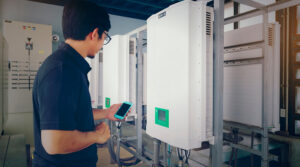
Most string inverters have a small LCD (Liquid Crystal Display) or LED (Light-Emitting Diode) screen. Press the buttons, and you will usually cycle through live power, today’s energy, lifetime energy, voltage, current, and any active fault. It is the simplest source of solar inverter details, and it keeps working even when your Wi-Fi does not.
Solar Inverter Information in the Monitoring App or Web Portal
A Wi-Fi dongle or 4G data logger sends your readings to a phone app or a solar energy monitoring system. This is where solar inverter information becomes useful over time: day-by-day graphs, monthly totals, and fault alerts. If you want to compare today’s solar inverter details with last Tuesday’s, the app is the place to do it.
Your PM Surya Ghar Muft Bijli Yojana Records
If your plant was installed under the Pradhan Mantri Surya Ghar: Muft Bijli Yojana (PM Surya Ghar), a lot of solar inverter information now travels beyond your own app. The Ministry of New and Renewable Energy (MNRE) has issued directions on inverter communication devices, Machine-to-Machine (M2M) SIM-based monitoring, and daily generation data sharing. Your application and commissioning status are on the official PM Surya Ghar portal, and MNRE posts its latest notices at mnre.gov.in.
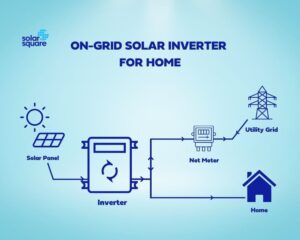
One thing to remember: your net meter, read by your distribution company (DISCOM), records grid import and export for billing. The inverter records what the panels produced. The two will not match exactly, and that is normal.
Solar Inverter Technical Details Explained: What Each Reading Means
This is where most owners get lost. The solar inverter technical details on your screen fall into three groups: generation, DC input from the panels, and AC output to your home and the grid. Take these solar inverter technical details one at a time.
1. Solar Inverter Details on Generation: kW vs kWh
Kilowatt (kW) is power right now. Kilowatt-hour (kWh) is energy over time, and it is the “unit” on your electricity bill. A plant producing 3 kW for two hours has generated 6 kWh. These solar inverter details are the first thing to check.
| Solar inverter detail | What it tells you | Best used for |
| Current power (kW) | Output at this moment | Midday health check |
| Today’s energy (kWh) | Units made since sunrise | Comparing similar days |
| Total energy (kWh) | Lifetime generation | Long-term trend and payback |
2. Solar Inverter Technical Details on the DC Side: Voltage and Current
Panels produce direct current (DC). The photovoltaic (PV) voltage in volts (V) and current in amperes (A) show what your panels are feeding the inverter. Voltage depends mostly on how many panels are connected in a string, while current rises and falls with sunlight. So in the morning, voltage jumps quickly and current climbs slowly.
Most inverters use Maximum Power Point Tracking (MPPT), which keeps adjusting current and voltage to maximise power output. If your inverter has two inputs (PV1 and PV2), similar readings are generally expected when the connected strings have similar panel counts, orientations, and shading conditions. A big gap is worth checking.
Temperature affects solar-panel performance. The power output of a PV solar module typically decreases as its cell temperature rises, but the rate depends on the module’s temperature coefficient. RETC’s 2025 PV Module Index Report found that more than 52% of the tested module models met its high-achiever criterion for temperature coefficient, defined as better than −0.3% per °C. This means the power loss varies by panel technology and design, so check the temperature coefficient on your module’s datasheet.
Source: Renewable Energy Test Center (RETC), 2025 PV Module Index Report
3. Solar Inverter Information on the AC Side: Voltage, Current and Frequency
Alternating current (AC) readings show how the inverter is feeding your home and the grid. Voltage should stay close to the grid’s nominal value, and frequency (in hertz, Hz) should hover near 50 Hz. If the grid drifts out of range, the inverter pauses export on purpose. That is a safety feature, and the Central Electricity Authority (CEA) covers connectivity and protection expectations in its technical standards for distributed generation.
| Solar inverter technical detail | Unit | What normal looks like | Red flag |
| DC voltage | V | Rises at sunrise, stays within the MPPT range in your manual | Above the maximum DC voltage, or near zero in bright sun |
| DC (Direct Current) | A | Follows sunlight; strings look alike | One string far below the other |
| AC voltage | V | Steady near the nominal grid value | Repeated over- or under-voltage warnings |
| Frequency | Hz | Close to 50 Hz | Frequent frequency faults |
| Inverter temperature | °C | Warm, but steady | Repeated over-temperature alerts |
The exact limits for your model are in its datasheet, so keep the solar inverter technical details handy: maximum DC voltage, MPPT range, and rated AC output.
How to Read Solar Inverter Data for Performance
Numbers mean little on their own, and solar inverter information only helps when you know how to read and compare it. Performance is about comparison, so this section shows how to read solar inverter data against the weather, the season and your own history.
Read the Daily Curve
On a clear day, power should rise through the morning, peak near noon, and fall gently by evening, like a smooth bell. Passing clouds cause short dips that recover quickly, and that is normal.
| Pattern | What it usually means |
| Smooth bell curve | Healthy day |
| Brief dips, quick recovery | Passing clouds |
| Flat top well below normal | Clipping, shading or a limit on output |
| Drops to zero in daylight | Grid outage, trip or fault |
| Lower peak every clear day | Dust, shading or a developing issue |
Compare Solar Inverters on the Same Parameters
One day tells you little. Compare clear days with clear days, and monsoon weeks with monsoon weeks. A slow slide in output over several clear weeks often points to dust on the panels, while a sudden step down points to a fault or new shading. These solar inverter details help you separate weather from hardware, and they show how to read solar inverter data like a trend, not a snapshot.
Performance Ratio: Solar Inverter Technical Details in Plain Words
Solar performance ratio (PR) compares the energy your plant actually delivered with the energy it should have delivered for the sunlight it received. It is defined in an international standard and used by most solar companies to judge plant health. Homes rarely have a sunlight sensor, so ask your installer for your plant’s expected monthly generation and track against that.
Solar Inverter Technical Details: Peak Efficiency Is Not Annual Yield
A datasheet may quote a very high maximum efficiency. That is a best-case point, not what you get all year. Among the solar inverter technical details, treat it as a comparison tool between models, not a promise about your bill.
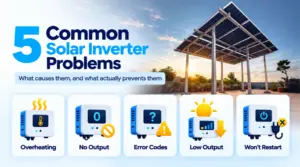
Solar Inverter Error Codes: Information You Should Not Ignore
Error codes differ by solar inverter brand, so your manual has the final word. The solar inverter information in a fault message is brand-specific, but the categories repeat across most models.
| Warning (typical wording) | What it usually points to | First step |
| Grid over/under voltage or frequency | Local grid out of range | Wait and watch; report to your DISCOM if it persists |
| No grid/grid loss | Outage or tripped supply | Normal during a power cut; it restarts on its own |
| Insulation or ground fault | Leakage on the DC side, moisture, or a damaged cable | Do not touch; call your installer |
| DC over-voltage | String layout or very cold conditions | Call your installer |
| Over-temperature | Poor ventilation or a hot location | Clear airflow around the unit |
| Communication lost | Wi-Fi or 4G dongle issue | Restart the router, then the dongle |
What You Can Safely Do, and When to Call
- Note the time and photograph the code before it clears.
- Restart only as your manual describes.
- Never open the inverter or handle DC cables yourself.
- Call your installer if you see zero daylight generation, repeated faults, or a steady output drop with no weather reason.
- Keep your inverter’s model and serial number ready.
Your 5-Minute Weekly Check: Solar Inverter Information and Details
Check the following 5 things every week to make sure that your home rooftop solar is working properly:
- Note today’s kWh and compare it with a similar sunny day.
- Look at the midday kW peak.
- Check DC voltage and current on every input.
- Check AC voltage and frequency.
- Scan the fault log.
Make Your Solar Inverter Data Work for You
Reading your inverter comes down to three habits: check generation (kW and kWh), compare voltage and current against your manual, and never ignore a repeated error. These quick checks take about five minutes and can help you spot dust, shading, or faults before they reduce solar generation.
That is the heart of how to read solar inverter data: compare, don’t just look. A smooth daily curve and steady monthly totals mean your plant is doing its job. A change with no weather reason means it is time to ask questions.
If your readings look unfamiliar, or you are planning a rooftop system you can monitor with confidence, SolarSquare can help. Book a free solar consultation with SolarSquare to get started.
Frequently Asked Questions
What are normal solar inverter technical details for voltage and current?
They vary by model and string size. DC voltage should sit within the MPPT range printed in your datasheet, and AC voltage should stay near the grid’s nominal value. Current follows sunlight.
Why does my solar inverter show zero generation?
At night, it is expected for your solar inverter to show zero generation. In daylight, the usual causes are a grid outage (the inverter shuts down for safety), a tripped breaker, or a fault. If it persists, contact your solar installer.
What is the difference between kW and kWh on a solar inverter?
kW (kilowatts) measures how much power your solar system produces at a given moment, while kWh (kilowatt-hours) measures how much electricity it generates over time. For example, a 3 kW solar system running at full capacity for one hour would generate 3 kWh (3 units) of electricity. Your savings depend on kWh. Read in detail about kW vs. kWh here.
How do I know from solar inverter data if my system is working properly?
Check your solar inverter’s daily energy generation (kWh) to see how much electricity your system produces. Compare it with its usual output under similar weather conditions. Also, check for error messages, warning lights, or unexpected drops in generation. If the output stays unusually low despite good sunlight, contact your solar installer for a system check.
Why is my solar inverter output lower than its rated capacity?
Your solar inverter may produce less than its rated capacity due to cloudy weather, high temperatures, dust on panels, shading, or normal system losses. The rated capacity is the maximum power it can handle under specified conditions, not a constant output. Check your system’s generation under similar weather conditions before assuming there is a fault.
What should I do when my inverter shows an error code?
Note the code, check your manual, and try only the safe steps listed there. Call your installer for ground faults, over-voltage, or repeated errors.
Can I check solar inverter information on my phone?
Yes, if your inverter has a Wi-Fi or SIM-based communication device. Under PM Surya Ghar, MNRE has issued rules on such devices, so confirm yours is set up.


 Previous Article
 16 min